शुरू करें
Install से लेकर पहले workspace तक दो मिनट में। Beadbox bd CLI को wrap करता है, इसलिए दोनों install करने होंगे।
1beads CLI install करें
bd command Beadbox का engine है। यह Git-backed storage का इस्तेमाल करके locally issues, epics और dependencies manage करता है।
brew install beadsHomebrew ज़रूरी है। bd binary आपके PATH में install होती है।
Install verify करें:
bd --versionआपको version number दिखना चाहिए। अगर command नहीं मिलता, तो install directory आपके PATH में है यह सुनिश्चित करें।
2Beadbox install करें
Beadbox एक native desktop app है। अपने platform का installer चुनें।
brew install --cask beadbox/cask/beadboxया GitHub Releases से सीधे DMG डाउनलोड करें।
3पहली बार लॉन्च
Beadbox खोलें। आगे क्या होगा, यह आपके setup पर निर्भर करता है।
beads में नए हैं? कोई workspace नहीं है?
Beadbox startup पर bd CLI चेक करता है। अगर नहीं मिलता, तो install instructions और "Check again" बटन के साथ एक welcome screen दिखेगा।
bd detect होने के बाद, आपको Quick Start card दिखेगा। एक project folder चुनें, Set Up Workspace पर क्लिक करें, और Beadbox आपके लिए bd चला देगा। Workspace तैयार है; सारा data आपकी मशीन पर रहता है।
पहले से bd इस्तेमाल कर रहे हैं? Workspaces हैं?
Beadbox आपके ~/.beads/registry.json और .beads/ folder वाली project directories से workspaces detect करता है। Workspace पर क्लिक करके उसे खोलें। Epic tree live status indicators के साथ load होता है।
Terminal के changes real-time में propagate होते हैं। अपने terminal में bd update <id> --status closed चलाएँ और Beadbox में status update देखें, refresh की ज़रूरत नहीं।
4आपको क्या दिखेगा
Main screen में तीन zones हैं:
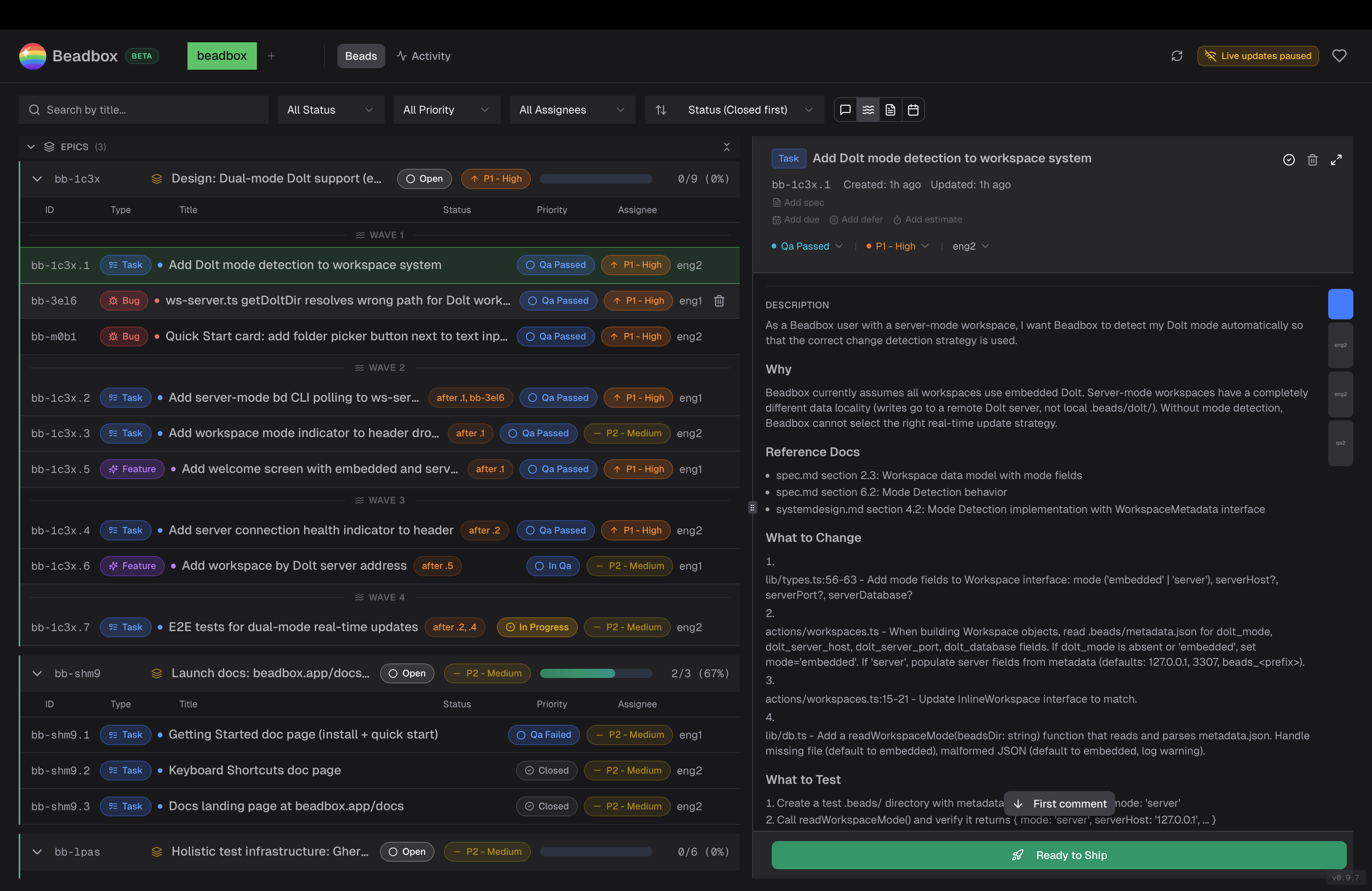
Header
Workspaces के बीच switch करें, connection status देखें, और manual refresh trigger करें। Keyboard shortcut settings भी यहीं हैं।
Filter bar
Status, priority, assignee या full-text search से filter करें। Updated, created, priority या status से sort करें। Filters हर workspace के लिए save रहते हैं।
Epic tree (बायाँ)
Epics और उनके children का hierarchical view। Expand करके status badges, priority indicators और progress counts देखें। किसी भी bead पर क्लिक करके details खोलें।
Detail panel (दायाँ)
पूरा bead metadata: description, comments, dependencies, acceptance criteria। सब markdown में render होता है।
अगले कदम
- Vim-style navigation (j/k/h/l, gg, G) के लिए keyboard shortcuts सीखें।
- Epics, dependencies और Dolt-backed version control के बारे में जानने के लिए beads CLI docs पढ़ें।