संपादकीय टिप्पणी (09/2026 अपडेट): यह post real-time pipeline का वह रूप बताता है जो v0.25 से पहले था। Beadbox अब WebSocket server नहीं चलाता — app कोई network listener खोलता ही नहीं। Change events अब sidecar के stderr पर kkrpc से आते हैं। आपके लिए कुछ नहीं बदला: CLI writes अब भी बिना refresh किए UI में दिखते हैं। सिर्फ़ mechanism बदला है। इस post में दिए गए update-speed के आँकड़े भी वापस लिए जाते हैं: change कितनी जल्दी दिखता है यह platform पर निर्भर करता है, और अब हम कोई संख्या नहीं बताते।
Linear fast है। Credit जहाँ due है। उन्होंने perceived performance में heavy investment किया है, और ज़्यादातर teams के लिए यह best available SaaS issue tracker है। पर "best SaaS" कुछ constraints के साथ आता है जो कुछ developers accept नहीं कर सकते: data किसी और के servers पर रहता है, workflow उनकी opinions के हिसाब से बदलना पड़ता है, और हर interaction network round-trip tax pay करती है।
यह post उन developers के लिए है जो इन दीवारों से टकरा चुके हैं। शायद AI agent fleets manage कर रहे हैं जो per hour 50 issues file करते हैं। शायद air-gapped या offline-first काम करते हैं। शायद बस login screen नहीं चाहते अपने issues और अपने बीच। यहाँ बताता हूँ क्या सीखा Beadbox बनाते हुए, एक native desktop issue tracker जो सब कुछ local रखता है।
जो section चाहिए उस पर जाएँ:
Developers Linear alternatives क्यों ढूँढते हैं
Usual answer है "Linear बहुत opinionated है।" सच है पर imprecise। Linear cycles, team structures, और workflow states enforce करता है जो assume करते हैं कि आप product team हैं जो two-week cadences पर ship करती है। अगर आप वही हैं, Linear great है। अगर solo developer हैं AI agents coordinate कर रहे, या research team हैं non-standard iteration patterns के साथ, या DevOps group जिसे issues git commits से tied चाहिए Slack threads से नहीं, Linear की opinions friction बन जाती हैं।
Deeper problem architectural है। Linear cloud-first SaaS product है। हर mutation उनके servers पर जाता है और वापस आता है। हर query उनके uptime पर depend करती है। Issue data उनके database में exist करता है, उनकी API से queryable, उनकी terms पर। ज़्यादातर teams के लिए fine trade-off है। Data sovereignty, offline access, या large datasets पर raw query speed care करने वाले developers के लिए dealbreaker है।
Beadbox क्या नहीं करता
इससे पहले कि Beadbox किसमें अच्छा है बताएँ, यह रहा जहाँ सही choice नहीं है। यह section skip करने से मदद नहीं मिलेगी; tool adopt करने के बाद इन walls से टकराना और बुरा होगा।
Multi-user permissions या access control नहीं। कोई user accounts नहीं, roles नहीं, per-issue visibility restrictions नहीं। .beads/ directory (या Dolt server) को filesystem access वाला कोई भी सब कुछ read और write कर सकता है। अगर restrict करना है कौन क्या देखे, Beadbox आज आपके लिए नहीं।
Limited real-time collaboration। दो लोग same issue set पर काम कर सकते हैं, पर collaboration model push/pull है (Git जैसा), live cursors और presence indicators नहीं। Server mode में Beadbox हर 3-5 seconds changes poll करता है। Embedded mode में filesystem watches changes faster detect करती हैं (sub-second), पर दो processes से same Dolt database में concurrent writes crash कर सकते हैं। Safe pattern: एक समय पर एक writer, या server mode use करें जहाँ Dolt concurrency handle करता है।
Slack, GitHub, Figma, या दूसरे SaaS tools से integrations नहीं। Extension point bd CLI और shell scripts हैं। अगर workflow depend करता है "issue close होने पर Slack message trigger हो," वह glue खुद build करना होगा।
Scale ceiling real है पर दूर। हम 10K और 20K issue datasets पर test करते हैं (benchmarks नीचे)। वे अच्छे handle होते हैं। 100K+ issues पर stress-test नहीं किया। अगर large organization हैं जो per year hundreds of thousands issues generate करती है, यह proven territory नहीं।
Non-technical stakeholder access नहीं। कोई web portal नहीं, guest viewer नहीं, shareable dashboard URL नहीं। Beadbox desktop app है जो local database read करता है। PM को progress दिखाने के लिए जो आपकी machine use नहीं करता, screen share या bd script चाहिए जो report generate करे।
Beadbox कैसे काम करता है (30-second version)
Benchmarks समझ आएँ, पहले architecture:
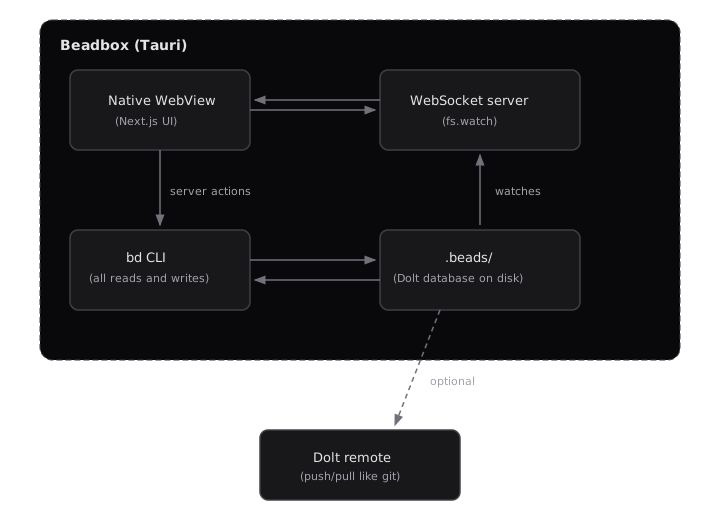
Embedded mode: Dolt database filesystem पर .beads/ में रहता है। कोई server process नहीं, daemon नहीं। bd CLI directly read और write करती है। Beadbox 250ms debounce के साथ fs.watch() से changes detect करता है और WebSocket से UI में broadcast करता है। यह zero-setup path है।
Server mode: dolt sql-server process separately run होता है (local या LAN)। bd CLI MySQL protocol से connect करती है। Beadbox filesystem watch की जगह हर 3-5 seconds server poll करता है। यह mode multiple concurrent writers support करता है।
GUI जो भी operation perform करता है, bd CLI से route होता है। Beadbox कभी directly database touch नहीं करता। अगर bd show और Beadbox disagree करें, वह Beadbox में bug है।
beads CLI benchmarks publish करता है जो अपने hardware पर reproduce कर सकते हैं। M2 Pro पर 10,000-issue Dolt database के against Go benchmark suite से real numbers:
| Operation |
Time |
Memory |
Dataset |
| Ready work filter (unblocked issues) |
30ms |
16.8 MB |
10K issues |
| Search (all open, no filter) |
12.5ms |
6.3 MB |
10K issues |
| Issue create |
2.5ms |
8.9 KB |
10K issues |
| Issue update (status change) |
18ms |
17 KB |
10K issues |
| Cycle detection (5K linear chain) |
70ms |
15 KB |
5K deps |
| Bulk close (100 issues) |
1.9s |
1.2 MB |
Sequential writes |
| Sync merge (10 creates + 10 updates) |
29ms |
198 KB |
Batch operation |
ये CLI-level benchmarks हैं: bd को local Dolt database से read/write करने में लगने वाला time। Beadbox UI ऊपर rendering overhead add करता है। Full stack (CLI call + React render + WebSocket propagation) के design targets:
| UI operation |
Design target |
| Epic tree render (100+ issues) |
< 500ms |
| Filter apply/clear |
< 200ms |
| Workspace switch |
< 1 second |
| Real-time update propagation (embedded) |
< 2 seconds |
| Cold start to usable |
< 5 seconds |
Linear या दूसरे trackers के against benchmarks publish नहीं करते क्योंकि controlled comparisons नहीं चलाए, और cherry-picked numbers honest नहीं होते। जो कह सकते हैं: पूरा data path local है। Filter click करने और results देखने के बीच कोई network hop नहीं। यह matter करता है या नहीं, आपकी baseline पर depend करता है। अगर Linear आपके dataset size और location पर enough fast feel होता है, शायद है। अगर conference hotel Wi-Fi से 500-issue backlog पर lag feel किया है, पता है इन numbers से कौन सा pain address होता है।
Reproduce करने के लिए: beads clone करें, go test -tags=bench -bench=. -benchmem ./internal/storage/dolt/... run करें, अपने hardware से compare करें।
Git integration depth: commits को issues से link करने से आगे
ज़्यादातर issue trackers Git integration को feature checkbox मानते हैं: commit message में issue ID mention करो, issue पर link दिख जाता है। Useful है पर shallow।
Beadbox beads पर बना है, एक issue tracker जहाँ Git semantics storage layer हैं, bolted-on integration नहीं। Dolt, नीचे का database, structured data के लिए Git का merkle tree data model implement करता है। हर issue change एक commit है। हर commit का parent है। Issue history पर dolt diff, dolt log, और dolt merge मिलता है उन्हीं semantics से जो code पर use करते हैं।
Practically इसका मतलब:
Issue history auditable है। Database खुद commit graph है। किन्हीं दो points diff करके exactly देख सकते हैं कौन से fields किन issues पर बदले। यह ऊपर bolt किया गया "audit log feature" नहीं। Storage format ही audit trail है।
Branching issues पर काम करती है, सिर्फ code पर नहीं। Dolt natively branches support करता है। Issue database branch करके reorganization experiment कर सकते हैं, फिर merge back या throw away।
Sync push/pull है, API calls नहीं। Multi-machine collaboration git push और git pull जैसे काम करता है। कोई API tokens नहीं, webhooks नहीं, OAuth flows नहीं। Dolt remote server (या DoltHub) पर point करें और push करें। दूसरी machine pull करे।
Conflicts पर note: Dolt three-way merge use करता है, Git जैसा। अगर दो लोग same issue पर different fields edit करें, merge automatically resolve होता है। अगर दो लोग same issue पर same field edit करें, conflict आता है जो Dolt CLI (dolt conflicts resolve) से manual resolution माँगता है। Beadbox में conflict resolution UI अभी नहीं है; conflicts dolt level पर handle होते हैं। Practice में, conflicts rare हैं जब हर person (या agent) distinct issues पर काम करता है, जो typical pattern है। पर अगर team frequently same issues concurrently edit करती है, यह friction point जानने योग्य है।
Native rendering: Node.js Tauri के अंदर क्यों bundle करते हैं
Linear browser tab में run होता है। Jira, Asana, और बाकी सब SaaS trackers भी। Browser tabs memory compete करते हैं, OS suspend करता है, और compositor से render होते हैं जो frames of latency add करता है।
Beadbox Tauri पर बना native desktop application है। Tauri apps typically tiny होते हैं (Tauri runtime single-digit megabytes) क्योंकि Chromium bundle करने की जगह OS native WebView use करते हैं। हमारा bundle typical Tauri apps से बड़ा ~160MB है, और यह deliberate tradeoff है।
उसमें 84MB embedded Node.js runtime है। Sidecar architecture use करते हैं: Tauri Next.js server को child process के रूप में spawn करता है, जो server-side rendering, server actions, और real-time updates के लिए WebSocket layer handle करता है। Tauri WebView इस local server पर point करता है। Pure Rust backend की जगह यह इसलिए choose किया क्योंकि Next.js ecosystem React Server Components, server actions, और UI layer पर rapid iteration speed देता है। Cost bundle size है। Equivalent Electron app 400MB+ होता। Pure Rust + Tauri app 10MB से कम होता पर build करने में 3x ज़्यादा लगता और React ecosystem खो जाता।
Editor's note (2026-04 update): This architecture description reflects Beadbox v0.24 and earlier. As of v0.25, Beadbox migrated from the Node.js + Next.js sidecar to a compiled Bun binary spawned via tauri-plugin-js, with Vite + TanStack Router replacing Next.js on the UI side. Bundle size and the trade-off math have shifted; the rationale for picking native + sidecar over Electron or pure Rust still holds. See ADR-2008 in the repo for the migration record.
Browser tab से practical difference: Beadbox dedicated WebView process में render होता है जो बाकी 47 browser tabs से memory share नहीं करता। 100+ nested issues वाला epic tree expand करना, full backlog पर filters apply करना, workspaces switch करना: ये operations qualitatively different feel होते हैं जब renderer resources compete नहीं कर रहा।
CLI से extend करें, REST API से नहीं
Linear का GraphQL API है। Well-designed है। पर Linear extend करने का मतलब code लिखना जो उनके servers से बात करे, उनके tokens से authenticate करे, और उनकी rate limits handle करे।
Beadbox different approach लेता है: bd CLI ही API है। GUI जो भी operation perform करता है, bd से जाता है, वही command-line tool जो terminal में use करते।
तीन workflows जो आज copy-paste कर सकते हैं:
Triage sweep के लिए bulk-update priorities:
# सभी open bugs को priority 1 (critical) set करें
bd list --status=open --type=bug --json | \
  jq -r '.[].id' | \
  xargs -I{} bd update {} --priority=1
Daily status summary generate करें:
# पिछले 24 घंटों में क्या बदला?
echo "=== Closed today ==="
bd list --status=closed --json | \
  jq -r '.[] | select(.updated > (now - 86400 | todate)) | "\(.id) \(.title)"'

echo "=== Currently blocked ==="
bd blocked --json | \
  jq -r '.[] | "\(.id) \(.title) (blocked by: \(.blocked_by | join(", ")))"'

echo "=== Ready to work ==="
bd ready --json | jq -r '.[] | "\(.id) [P\(.priority)] \(.title)"'
AI agent काम बनाता और claim करता है:
# Agent bug discover करता है, file करता है, और claim करता है
ISSUE_ID=$(bd create \
  --title "Fix race condition in auth middleware" \
  --type bug \
  --priority 1 \
  --json | jq -r '.id')

bd update "$ISSUE_ID" --status=in_progress --assignee=agent-3

# ... agent काम करता है ...

bd update "$ISSUE_ID" --status=closed
bd comments add "$ISSUE_ID" --author agent-3 \
  "Fixed in commit abc1234. Root cause: mutex not held during token refresh."
अगर AI coding agents (Claude Code, Cursor, Copilot Workspace) run कर रहे हैं, वे पहले से CLI commands run करना जानते हैं। कोई API client library नहीं, authentication dance नहीं। बस Unix pipes और shell scripts।
Beadbox try करें ये workflows real time में visualized देखने के लिए जैसे agents execute करते हैं।
Offline-first feature नहीं, architecture है
कुछ cloud trackers "offline mode" offer करते हैं जो recent data cache करता है और reconnect पर sync करता है। यह fundamentally online architecture पर bolt किया feature है। Failure modes predictable हैं: stale cache, sync conflicts, operations जो silently queue होकर बाद में fail होते हैं।
Beadbox offline काम करता है क्योंकि शुरू से online नहीं था। Embedded mode में, पूरी issue database filesystem पर एक directory है। कोई server process नहीं। Daemon नहीं। Network socket नहीं। bd CLI उस directory read और write करती है। Beadbox fs.watch() से watch करता है और जो मिलता है render करता है।
Sync करने को कुछ नहीं क्योंकि remote कुछ नहीं। अगर बाद में collaborate करना चाहें, Dolt का push/pull explicit, visible synchronization देता है। पर default local है। Default आपका है।
Security के बारे में? अगर air-gapped या sensitive environments के लिए Beadbox evaluate कर रहे हैं, concrete posture:
- Encryption at rest: Beadbox
.beads/ directory खुद encrypt नहीं करता। OS-level disk encryption पर rely करता है (macOS पर FileVault, Linux पर LUKS, Windows पर BitLocker)। अगर threat model per-database encryption demand करता है, यह gap है।
- Backups:
.beads/ directory regular directory है। cp -r, rsync, Time Machine, या dolt push to remote सब काम करते हैं। Dolt की commit history का मतलब accidental changes dolt reset से rollback हो सकते हैं।
- Machine से क्या बाहर जाता है: Embedded mode में, कुछ नहीं। Zero network calls। Desktop app में, दो optional outbound connections: Beadbox updates check करने के लिए GitHub API (settings में disable हो सकता), और PostHog analytics अगर opt in करें (default off, कोई PII collect नहीं)। दोनों में से कोई issue data transmit नहीं करता।
Air-gapped environments, classified projects, या planes और trains में काम करने वाले developers के लिए, यह nice-to-have नहीं। यही एक architecture है जो काम करता है।
Per-seat pricing का जाल नहीं
Linear Standard plan पर per member $8/month charge करता है। पाँच लोगों की team के लिए reasonable। जब "team" में 13 AI agents शामिल हों जिन्हें issues read और write करने हैं, तब उतना reasonable नहीं।
Per-seat model stable, human-sized teams assume करता है। Agentic engineering उस assumption को तोड़ता है। Bug fix के लिए 3 agents और release के लिए 13 spin up कर सकते हैं। हर एक को API access चाहिए। SaaS pricing में, हर agent एक seat है। हर seat एक line item है। Cost linearly scale होता है उस resource के लिए जिसे exponentially scale कर रहे हैं।
beads open-source है। CLI free है। कोई per-seat fee नहीं, usage tier नहीं, "enterprise के लिए sales से contact करें" नहीं। Same local database पर 2 agents चलाएँ या 200, cost नहीं बदलता।
Beadbox (GUI) beta में free है। Post-beta pricing finalize नहीं हुआ, पर per-seat नहीं होगा। Agents लोग नहीं हैं। Per agent charge करना उतना ही sensible है जितना per terminal window charge करना।
Open-source ecosystem
beads walled garden नहीं है। CLI github.com/gastownhall/beads पर open-source है, और community ने 30+ tools बनाए हैं: custom reporters, CI integrations, agent orchestration scripts, dashboard extensions, और export adapters।
Practically इसका मतलब:
सब कुछ inspect कर सकते हैं। Storage format Dolt है, standard SQL से query होता है। CLI source code Go है, readable और forkable। अगर bd create कुछ unexpected करे, execute होने वाला code पढ़ सकते हैं।
Permission माँगे बिना extend कर सकते हैं। Marketplace approval process नहीं, partner program नहीं, API rate limit negotiation नहीं। Shell script, Go plugin, या Python wrapper लिखें। CLI की हर command पर --json flag structured output देता है जो कुछ भी build करें उसमें pipe कर सकते हैं।
Data portable है। Dolt का push/pull मतलब issue database किसी भी server पर रह सकता है जो आप control करते हैं, DoltHub से sync हो सकता है, या filesystem पर हमेशा रह सकता है। Export wizard नहीं है क्योंकि export करने को कुछ नहीं। Data पहले से आपका है, ऐसे format में जो directly query हो सकता है।
Community agent-specific tooling build कर रही है। beads daily use करने वाले developers वही हैं जो AI agent fleets run करते हैं। वे जो extensions build करते हैं agent coordination problems solve करते हैं: batch operations, dependency resolution scripts, fleet status reporters। यह theoretical community engagement नहीं। Practitioners हैं जो अपने workflows के लिए tools build करके publish करते हैं।
Agent-aware coordination
ज़्यादातर issue trackers "automation" को एक webhook मानते हैं जो human status change करे तब fire हो। यह human-first workflow पर API retrofit करना है। beads और Beadbox शुरू से AI agent coordination के लिए design किए गए।
Structured agent identity। हर agent के पास CLAUDE.md file है जो role, boundaries, और communication protocol define करती है। bd CLI के --actor और --author flags हर action को specific agent से tie करते हैं। जब eng2 task claim करे और plan post करे, system जानता है कि eng2 था, generic "automation" नहीं।
bd prime command। किसी भी workspace में bd prime run करें और यह AI coding assistants के लिए designed context block output करता है। Agent के system prompt में paste करें और वह पूरा command set, output formats, और workflow patterns जान जाएगा। नए agent को beads सिखाने में एक command लगता है, documentation page नहीं।
Dependency graphs जो agents actually use करते हैं। Agents Kanban boards से काम नहीं करते। Trees और blockers से करते हैं। beads parent/child relationships और blocking dependencies natively track करता है। bd blocked हर bead दिखाता है जो किसी और चीज़ का wait कर रहा। bd ready सब कुछ दिखाता है जो unblocked और काम के लिए ready है। Beadbox इसे interactive dependency tree के रूप में render करता है जहाँ एक नज़र में दिख जाता है क्या stuck है और क्यों।
Real-time fleet visibility। Beadbox beads database में changes watch करता है और seconds में UI update करता है। Activity Dashboard agent status cards दिखाता है (कौन active, कौन quiet, कौन stuck), pipeline flow (काम कहाँ pile up हो रहा), और cross-filtered event feed (agent पर click करें सिर्फ उसके actions देखने के लिए)। यह "mission control" view है जो 13 parallel agents manageable बनाता है।
कोई tool universally सही नहीं। Honest breakdown:
Linear choose करें अगर:
- Team 10+ लोग है और centralized project management चाहिए
- Slack/GitHub/Figma integrations पर rely करते हैं
- Non-technical stakeholders को issue tracker access चाहिए
- Zero operational overhead वाला managed infrastructure चाहिए
- Product team हैं regular cycles पर shipping
Beadbox choose करें अगर:
- Data sovereignty value करते हैं (issues कभी machine नहीं छोड़ते)
- Regularly offline या restricted network environments में काम करते हैं
- AI agents manage करते हैं जिन्हें programmatically issues read और write करने हैं
- Git-native issue history चाहिए (issues branch, diff, merge करें)
- CLI-first workflows prefer करते हैं visual companion के साथ जब ज़रूरत हो
- Solo developer या small team (1-10) हैं जिन्हें enterprise features नहीं चाहिए
Current tool use करते रहें अगर:
- Switching cost experience कर रहे friction से ज़्यादा है
- Team ने current tracker की API पर depend करने वाले integrations में invest किया है
- Workflow पहले से tool की opinions में fit करता है
Linear (या दूसरे trackers) से Migration
Direct रहते हैं: आज Linear-to-Beadbox automated migration tool नहीं है। CSV import wizard नहीं, API bridge नहीं, status mapping UI नहीं।
Fresh start कर रहे हैं तो fine। bd init, issues create करना शुरू करें, Beadbox immediately देखता है। Zero friction।
Existing Linear project लाना हो तो workable path अभी scripted है: Linear की API से export (CSV और API export support करते हैं), data transform करें, loop में bd create use करके issues recreate करें। Linear-specific metadata (cycles, project views, SLA timers) lose होगा पर titles, descriptions, priorities, और status preserve होंगे। Migration script weekend project है, quarter-long integration नहीं।
हम जानते हैं thousands issues और years history वाली teams के लिए यह enough नहीं। Proper import pipeline roadmap पर है पर ship नहीं हुआ। अगर migration friction primary concern है, wait करें जब तक बना लें, या evaluate करें कि fresh start acceptable है।
शुरू करें
Beadbox beta में free है। Homebrew से install करें:
brew install --cask beadbox/cask/beadbox
अगर पहले से beads use करते हैं, Beadbox existing .beads/ workspaces automatically detect करता है। App खोलें, issues वहीं हैं। कोई import step नहीं। Account creation नहीं।
beads में नए हैं तो Beadbox first workspace initialize करने में guide करता है। 60 seconds से कम में issues देख रहे होंगे।
Beadbox download करें या beads check करें कि local-first issue tracking आपके workflow में fit करती है।