Editor's note (2026-09 update): This post describes the real-time pipeline as it worked before v0.25. Beadbox no longer runs a WebSocket server — the app opens no network listener at all. Change events now travel over kkrpc on the sidecar's stderr. What you see as a user is unchanged: CLI writes still appear in the UI without a refresh. Only the mechanism moved. Any update-speed figures in this post are withdrawn too: how fast a change appears depends on the platform, and we no longer quote a number.
Every issue tracker you've used follows the same pattern. There's a cloud service. It has a web UI. Someone builds a CLI that talks to the cloud API. The CLI is a second-class citizen: slower, less capable, always one API version behind.
Now flip that architecture. Start with the CLI. Make it write to a local database. Make the database version-controlled, with the same branching and merging semantics you use on source code. Then put a native desktop app on top that reads the same database files directly, no API in between.
That's what beads and Beadbox do. And the reason this architecture exists is AI agents.
The problem: agents can't click buttons
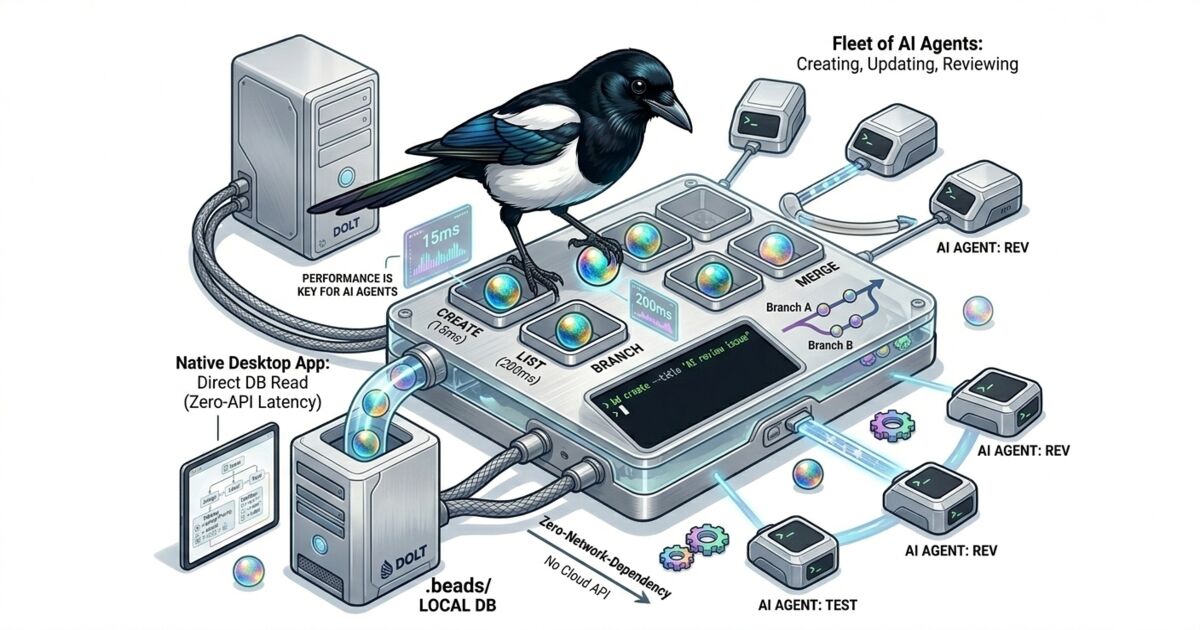
If you're coordinating a fleet of AI agents (code generators, reviewers, testers, deployers), you need them to create issues, update statuses, and read work queues. They can't authenticate to Jira. They can't navigate Linear's UI. They need a CLI that writes to a local database, fast, with zero network dependencies.
beads is that CLI. It's an open-source, Git-native issue tracker designed for exactly this workflow. The bd command creates, updates, lists, and closes issues. Every write lands in a local Dolt database inside your repository's .beads/ directory.
The numbers matter here. bd create takes roughly 15ms. bd list across 10,000 issues returns in about 200ms. These benchmarks come from the beads test suite. When agents are burning through work items in tight loops, milliseconds per operation determine whether your issue tracker keeps up or becomes the bottleneck.
Why Dolt, not SQLite?
Dolt is a SQL database that implements Git semantics. Every write is a commit. You get dolt diff to see what changed between two points. You get dolt log for full audit history. You get dolt branch and dolt merge with the same mental model you already use on code.
For issue tracking, this means your project history has two parallel audit trails: git log for code changes, dolt log for issue changes. You can answer questions like "what did the issue database look like when we tagged v2.1.0?" by checking out that point in Dolt history. You can branch your issue database to experiment with a reorganization, then merge it back or throw it away.
beads removed SQLite support in v0.9.0 and went all-in on Dolt. The version control semantics aren't a nice-to-have; they're the foundation. When twenty agents are writing to the same issue database, you want the ability to diff, branch, and merge that data with the same confidence you have in your source control.
Optional collaboration works through DoltHub. Push your issue database to a remote, pull changes from teammates. Same push/pull workflow as Git, applied to structured data.
This is the problem Beadbox solves.
Real-time visibility into what your entire agent fleet is doing.
Agents thrive with CLIs. Humans don't, at least not when they need the big picture. Dependency graphs, epic progress trees, blocked-issue chains: these are spatial problems that a terminal can't render well.
Beadbox is a native desktop application built with Tauri (not Electron) that reads the same .beads/ directory the CLI writes to. There's no import step, no sync process, no API layer. The GUI watches the filesystem via fs.watch(), detects Dolt database changes, and broadcasts updates over a local WebSocket. When an agent runs bd update BEAD-42 --status in_progress, the status badge changes in Beadbox within milliseconds.
Here's what the workflow looks like in practice:
# An agent creates an issue
bd create --title "Migrate auth to OIDC" --type task --priority 1

# Another agent claims it
bd update BEAD-42 --claim --actor agent-3

# A human opens Beadbox and sees the full board:
# dependency graphs, epic trees, filter by status/priority/assignee
# No commands needed. Just look.

# The agent finishes and marks it for review
bd update BEAD-42 --status ready_for_qa

# Beadbox updates in real time. The QA agent picks it up.
Agents write through the CLI. Humans read through the GUI. Both operate on the same local Dolt database. No reconciliation, no stale caches, no "let me refresh."
Beadbox runs on macOS, Linux, and Windows. It supports multiple workspaces, so you can switch between projects without restarting.
What "local-first" actually means
The term gets overused. Here's what it means concretely for beads and Beadbox:
No account. You don't sign up for anything. Install the CLI, install the app, point it at a directory. Done.
No cloud dependency. Everything runs on your filesystem. Your data never leaves your machine unless you explicitly dolt push to a remote. Internet goes down? Nothing changes. You keep working.
No server. There's no daemon to manage, no Docker container to run. The Dolt database is a directory of files. The CLI reads and writes those files. Beadbox watches those files.
Optional collaboration. When you do want to share, push to DoltHub. Your teammates pull. Merge conflicts on issue data resolve the same way they do on code. But this is opt-in, not required.
Compare this to the alternatives. Jira needs a server (or Atlassian Cloud). Linear needs an account and an internet connection. GitHub Issues needs a repository on GitHub's servers. Even self-hosted options like Gitea require running a web service.
beads needs a directory. Beadbox needs that same directory and a double-click.
Who this is for
If you run AI agents that need to coordinate through a shared work queue, and you want humans to monitor and steer that work visually, this stack was built for your workflow.
If you manage projects solo and want version-controlled issue tracking that lives next to your code, without a cloud account, this stack works for that too.
If you need Jira's enterprise permission model or Linear's collaborative real-time editing across a distributed team, this isn't the right tool. beads is local-first by design. That's a tradeoff, not an oversight.
Open Beadbox, point it at the directory, and you're looking at your issue board. No signup. No configuration wizard. No "connect your GitHub account" modal.
Beadbox is free while in beta.
Try it yourself
Start with beads for the coordination layer. Add Beadbox when you need visual oversight.
Free while in beta. No account required. Works natively with Dolt.