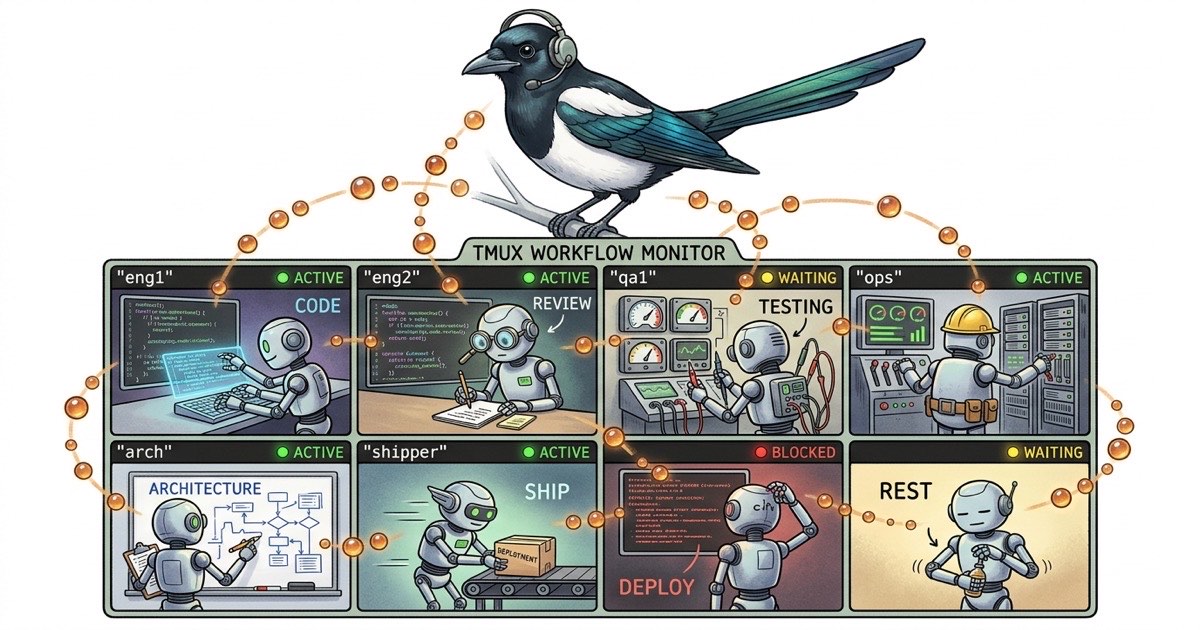
You've seen the screenshots. Five, ten, fifteen Claude Code agents running in tmux, each one working on a different piece of the same codebase. It looks productive. It looks exciting. And if you've tried to replicate it, you know it looks a lot easier than it is.
Running one Claude Code agent is straightforward. You give it a task, it writes code, you review. Running two is manageable but introduces a new problem: they might step on each other's changes. Running five requires a system. Running ten without a system is chaos with a monthly bill.
This guide is about that system. Not the theory of multi-agent architectures. The actual, practical workflow for running multiple Claude Code agents on a real codebase without everything falling apart.
Why One Agent Isn't Enough
A single Claude Code agent can handle a surprising amount of work. But it's sequential. While it's implementing a backend endpoint, your frontend sits idle. While it's writing tests, your documentation falls behind. While it's debugging a build failure, three new features wait in the queue.
The math changes when you realize that most software work is parallelizable. A frontend component and a backend API endpoint don't share files. A test suite and a documentation update touch different directories. An architecture review and a bug fix operate on different timescales entirely.
The bottleneck in single-agent development isn't the agent's speed. It's your pipeline depth. One agent means one thing in progress at a time. Multiple agents mean multiple things in progress simultaneously, and that changes what a single developer can ship in a day.
Work Splitting Strategies
Before you open a second tmux pane, you need to decide how to divide work. Three patterns hold up in practice.
Split by Component
The simplest approach. Agent A owns components/, Agent B owns server/, Agent C owns lib/. Each agent works in its own territory and never touches files outside it.
This works well when your codebase has clear architectural boundaries. A Next.js app with distinct frontend components, backend actions, and shared libraries splits naturally along those lines.
The limitation: cross-cutting work. A feature that requires changes to the UI, the API, and the database layer doesn't fit neatly into one agent's territory. You handle this by breaking the feature into component-scoped subtasks and sequencing them.
Split by Role
Instead of dividing by code location, divide by function. One agent writes code. Another writes tests. A third handles documentation. A fourth does code review.
This mirrors how human teams work and produces higher quality output because the test-writing agent doesn't know (or care) how easy the code was to write. It tests against the spec, not against the author's assumptions.
The tradeoff is more coordination overhead. The test agent needs the implementation agent to finish first. The documentation agent needs both. You're managing a pipeline, not just parallel workers.
Split by Lifecycle Stage
A more sophisticated version of role splitting. One agent brainstorms and plans. Another implements. A third verifies. The work flows through stages, and each agent is specialized for its stage.
This is the pattern we use at Beadbox. Our architect agent designs, our engineering agents implement, our QA agents verify independently. The same task flows through multiple specialists, and each one adds a layer of quality that generalist agents miss. I wrote about the full setup in I Ship Software with 13 AI Agents.
The right strategy depends on your project. Small projects with clear file boundaries do well with component splitting. Larger projects where quality matters benefit from role or lifecycle splitting. Most teams end up with a hybrid.
The CLAUDE.md Identity Pattern
Here's where theory meets implementation. Each Claude Code agent gets its own CLAUDE.md file, and this file is the single most important piece of the multi-agent system.
A CLAUDE.md defines four things:
- What the agent is. Its role, specialty, and domain.
- What it owns. The files, directories, or responsibilities it controls.
- What it must not touch. The explicit boundaries that prevent conflicts.
- How it communicates. The protocols for reporting work and coordinating with other agents.
Here's a real example. Two Claude Code agents with complementary scopes:
# CLAUDE.md for Agent: frontend-eng

## Identity
Frontend engineer. You implement UI components, pages, and client-side
logic. You own everything under components/, app/, and hooks/.

## File Ownership
- components/**  (you own these)
- app/**          (you own these)
- hooks/**        (you own these)
- lib/utils.ts    (shared, read-only for you)
- server/**       (DO NOT MODIFY — owned by backend-eng)

## Communication
When you need a backend change, create a task describing what API
you need. Do not implement it yourself.
When done with a task, comment: "DONE: <summary>. Commit: <hash>"
# CLAUDE.md for Agent: backend-eng

## Identity
Backend engineer. You implement server actions, API routes, and
data layer logic. You own everything under server/, actions/, and lib/.

## File Ownership
- server/**       (you own these)
- actions/**      (you own these)
- lib/**          (you own these, except utils.ts is shared)
- components/**   (DO NOT MODIFY — owned by frontend-eng)
- app/**          (DO NOT MODIFY — owned by frontend-eng)

## Communication
When you change a data type in lib/types.ts, notify frontend-eng
by commenting on the relevant task.
When done with a task, comment: "DONE: <summary>. Commit: <hash>"
Notice the explicit "DO NOT MODIFY" lines. Without these, agents drift. They see an opportunity to "help" by fixing a typo in a file they don't own, and suddenly you have merge conflicts. Or worse, they silently refactor code that another agent was depending on.
The identity section isn't decoration. Claude Code reads CLAUDE.md at the start of every session and uses it to scope its behavior. An agent told it's a "frontend engineer" will naturally resist making backend changes. An agent told it owns specific directories will ask before modifying files outside those directories.
Avoiding Merge Conflicts
File-level ownership, as shown in the CLAUDE.md examples above, is the first line of defense. But it's not the only one.
Commit and push frequently. An agent that works for 45 minutes without committing is building up a merge conflict time bomb. Instruct agents (in their CLAUDE.md) to commit after completing each logical unit of work.
Pull before starting new work. Each agent should git pull --rebase before beginning a new task. This is trivially easy to enforce by adding it to the agent's startup protocol in CLAUDE.md.
Use feature flags for cross-cutting work. When two agents need to modify the same file, the safer approach is often to have one agent create the interface or flag, commit and push, then have the second agent pull and build on top of it. Sequential beats parallel when the alternative is a merge nightmare.
Separate branches for risky work. If an agent is doing something experimental, give it its own branch. This is especially useful for architecture spikes or refactoring work that might not land.
In practice, the combination of file ownership rules and frequent commits eliminates 90% of merge conflicts. The remaining 10% happen in shared files like types.ts or package.json, and they're usually trivial to resolve.
Agent-to-Agent Communication
Claude Code agents can't talk to each other directly. There's no shared memory, no message bus, no real-time channel between them. This is actually a good thing. Direct communication between agents creates coupling, race conditions, and debugging nightmares.
Instead, communication happens through artifacts. Three patterns work:
The most reliable pattern. Agent A finishes work and comments on a shared task: "DONE: implemented the /api/users endpoint. Returns JSON. Schema is in lib/types.ts." Agent B reads the task comment and knows exactly what's available.
Status Updates
Each task has a status: open, in_progress, done, blocked. When Agent A marks a prerequisite task as done, Agent B (or you, or a coordinator) knows the dependent work can start.
File Changes
The simplest form. Agent A writes a TypeScript interface to lib/types.ts and commits. Agent B pulls and sees the new types. No explicit communication needed because the code itself is the message.
What does NOT work: trying to build a real-time message-passing system between agents. If you need Agent A to wait for Agent B's output, model that as a dependency between tasks, not as a synchronous call.
The Dispatch Loop
Someone needs to run the show. In a multi-agent Claude Code setup, there are two options: you do it manually, or you designate a coordinator agent.
Manual Dispatch
You maintain a task list. You assign tasks to agents. You check progress. You handle blockers. This works up to about five agents before the coordination overhead starts eating into the productivity gains.
A typical manual dispatch cycle looks like this:
- Morning: Review what's in progress, what's blocked, what's ready for work
- Assign: Send each agent its next task with context
- Monitor: Every 10-15 minutes, check agent output for signs of being stuck
- Unblock: When an agent hits a problem, intervene or reassign
- Close out: At end of day, review what shipped and queue tomorrow's work
In tmux, this looks like cycling through panes, reading recent output, and deciding what each agent needs next. Tools like gp (peek at an agent's recent output without interrupting it) help, but you're still the bottleneck.
Coordinator Agent
Dedicate one Claude Code agent to dispatching work to the others. This agent doesn't write code. It reads the task backlog, assigns work to available agents, checks on progress, and handles the dispatch loop programmatically.
This is the pattern we use. Our "super" agent runs a patrol loop: every few minutes, it peeks at each active agent, checks task statuses, identifies blockers, and dispatches new work when an agent goes idle. The human (me) makes the priority calls and resolves ambiguous situations. Super handles the logistics.
A coordinator agent needs its own CLAUDE.md:
# CLAUDE.md for Agent: super

## Identity
Dispatch coordinator. You assign work to agents, monitor progress,
and ensure the pipeline keeps moving. You do NOT write code.

## Responsibilities
- Maintain awareness of all active tasks and their statuses
- Assign ready tasks to idle agents
- Monitor agent progress every 5-10 minutes
- Escalate blockers to the human when agents can't self-resolve
- Verify agents follow the protocol: plan before code, test before done

## Communication
- To assign work: message the agent with task ID and priority
- To check progress: peek at agent's recent output
- To escalate: message the human with context and options
The coordinator pattern scales much better than manual dispatch. At 10+ agents, manual coordination is a full-time job. A coordinator agent handles the routine logistics and only escalates the decisions that require human judgment.
Tmux Layout for Multi-Agent Work
The physical layout matters more than you'd think. Here's a tmux configuration that works for running multiple Claude Code agents:
# Create a new tmux session
tmux new-session -s agents -n super

# Split into panes for each agent
tmux split-window -h -t agents:super
tmux split-window -v -t agents:super.1

# Or create named windows (easier to manage at scale)
tmux new-window -t agents -n eng1
tmux new-window -t agents -n eng2
tmux new-window -t agents -n qa1
tmux new-window -t agents -n frontend
tmux new-window -t agents -n backend
Named windows beat split panes once you pass four agents. You can't read five panes on a single screen, but you can quickly switch between named windows. The naming convention matters too. eng1, eng2, qa1 are instantly scannable. agent-1, agent-2, agent-3 tell you nothing.
Start each agent in its own working directory with its own CLAUDE.md:
# In the eng1 window
cd ~/project
claude --claude-md ./agents/eng1/CLAUDE.md

# In the qa1 window
cd ~/project
claude --claude-md ./agents/qa1/CLAUDE.md
One practical tip: keep a "dashboard" window that's just a shell. Use it to run git log --oneline -10, check task status, or peek at agents without interrupting their work. This becomes your command center.
When Things Go Wrong
Multi-agent workflows fail in predictable ways. Knowing the failure modes saves you from learning them the hard way.
Two agents edit the same file. Usually because the file ownership in CLAUDE.md wasn't specific enough. lib/utils.ts is a classic conflict magnet. Solution: either assign shared utility files to one specific agent, or make them read-only for everyone and route changes through a single owner.
An agent goes silent. It hit a rate limit, an error loop, or just got stuck in a deep chain of reasoning. Check the output. If it's retrying the same failing command, kill the session and restart with clearer instructions. Periodic health checks (every 10-15 minutes) catch this before you lose an hour.
Context windows fill up. Long-running agents accumulate context and start performing worse. Each agent's CLAUDE.md should include a protocol for this: "If you've been working for more than 90 minutes, save your state and request a fresh session." In practice, this means having the agent commit its work, note where it left off, and starting a new Claude Code session that picks up from that commit.
Work drifts from the spec. Agent builds something that technically works but doesn't match what was asked for. The fix is the plan-before-code pattern: before writing any code, the agent comments its implementation plan. You review the plan in 60 seconds and catch misunderstandings before they become 500-line diffs.
The pipeline stalls. Agent B is waiting on Agent A, but Agent A is waiting on a decision from you. Meanwhile Agent C finished its work 30 minutes ago and has been idle. This is a coordination failure, not a technical one. The coordinator agent (or you) needs to keep the pipeline moving by monitoring blockers and reassigning idle agents.
How We Solved This with Beads
Everything above works with sticky notes and good intentions. But around five agents, the informal approach starts cracking. You forget what Agent C was working on. You lose track of which tasks are blocked. You can't remember if the API endpoint Agent B needs was finished or just started.
This is the problem that beads solves. Beads is an open-source, local-first issue tracker. Every task is a "bead" with a unique ID, a status, a description, acceptance criteria, dependencies, and a comment thread. All of it accessible through a CLI called bd, which means your Claude Code agents can read and write to it without leaving the terminal.
Here's how the dispatch loop looks with beads:
# See what's ready for work
bd list --status open

# Assign a task to an agent
bd update bb-a1b2 --claim --actor eng1

# Agent reads its assignment
bd show bb-a1b2

# Agent comments its plan before coding
bd comments add bb-a1b2 --author eng1 "PLAN:
1. Add endpoint at /api/users
2. Define UserResponse type in lib/types.ts
3. Write integration test

Files: server/api/users.ts (new), lib/types.ts (modify)
Test: curl localhost:3000/api/users returns 200 with JSON array"

# Agent finishes and comments what it did
bd comments add bb-a1b2 --author eng1 "DONE: /api/users endpoint live.
Returns paginated JSON. Added UserResponse type.

Verification:
1. curl http://localhost:3000/api/users → 200, JSON array
2. curl http://localhost:3000/api/users?page=2 → 200, second page
3. pnpm test → all passing

Commit: 8f3c2a1"

# Agent marks the task done
bd update bb-a1b2 --status closed
Every agent follows this protocol: claim, plan, implement, comment DONE, update status. The comment thread on each bead becomes a complete audit trail of what happened, why, and how to verify it.
Dependencies prevent conflicting work:
# Create a task that depends on another
bd create --title "Build user list component" \
  --deps bb-a1b2 \
  --description "Frontend component that calls /api/users. Blocked until API is live."
The dependent task stays blocked until bb-a1b2 is done. No agent will pick it up prematurely. No one wastes time building a frontend for an API that doesn't exist yet.
The bd list command gives you a snapshot of the entire pipeline:
bd list --status in_progress
# Shows what every agent is actively working on

bd blocked
# Shows tasks waiting on unfinished dependencies

bd list --status open --priority p1
# Shows the highest-priority work that's ready to start
This replaces the mental model you were keeping in your head. The state of every task, every agent's current work, every dependency chain, all queryable from the command line.
Scaling Visibility
The CLI works. But at scale, there's a limit to how much you can absorb by running bd list in a terminal. When you have eight agents working across three epics with seventeen open tasks and a dozen dependencies, you need to see the shape of the work, not just a list of it.
This is the gap we built Beadbox to fill. Beadbox is a real-time dashboard that sits on top of beads and shows you:
- Epic trees with progress bars, so you see how each feature is progressing across all its subtasks
- Dependency graphs that surface blocked work before it stalls the pipeline
- Agent activity showing which agent is working on what, with their plan and done comments visible in context
- Real-time updates because the dashboard watches your beads database and refreshes as agents update task statuses
Beadbox doesn't replace the CLI. Your agents still read and write to beads through bd. Beadbox gives you the big picture so you can make the judgment calls: which epic is falling behind, which agent needs help, where the bottleneck is forming.
It's free during the beta. If you're building workflows like this, star Beadbox on GitHub.
Getting Started
You don't need thirteen agents to benefit from this. Here's the minimum viable setup:
- Two Claude Code agents in separate tmux windows, each with its own CLAUDE.md defining file ownership boundaries.
- A task list (even a text file works at this scale) so both agents know what they're working on and what's up next.
- A commit protocol: both agents commit frequently and pull before starting new work.
Once that feels natural, add a third agent for testing or documentation. Then consider a coordinator agent. Then adopt beads for structured task tracking. Scale the system as the coordination pain increases, not before.
The hard part isn't the tooling. It's the shift in thinking: from "I'm using an AI assistant" to "I'm running a team." The CLAUDE.md files, the dispatch protocols, the ownership boundaries: these are management practices, not configuration files. You're building an organization, even if the team members run on API calls.
Start with two agents and clear boundaries. Everything else follows from there.