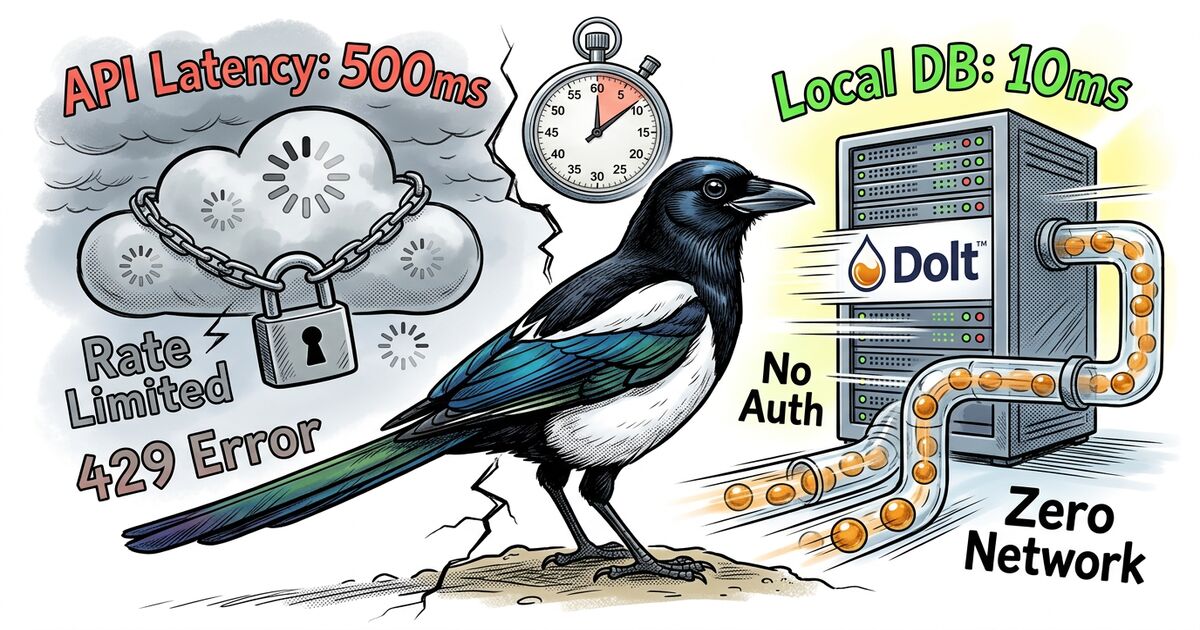
Linear is fast. Credit where it's due. They invested heavily in perceived performance, and for most teams, it's the best SaaS issue tracker available. But "best SaaS" comes with constraints that some developers can't accept: your data lives on someone else's servers, your workflow bends to match their opinions, and every interaction pays a network round-trip tax.
This post is for developers who've hit those walls. Maybe you're managing AI agent fleets that file 50 issues an hour. Maybe you work air-gapped or offline-first. Maybe you just don't want a login screen between you and your issues. Here's what we've learned building Beadbox, a native desktop issue tracker that keeps everything local.
Jump to what matters to you:
Why developers look for Linear alternatives
The usual answer is "Linear is too opinionated." That's true but imprecise. Linear enforces cycles, team structures, and workflow states that assume you're a product team shipping on two-week cadences. If that's you, Linear is great. If you're a solo developer coordinating AI agents, or a research team with non-standard iteration patterns, or a DevOps group that needs issues tied to git commits rather than Slack threads, Linear's opinions become friction.
The deeper problem is architectural. Linear is a cloud-first SaaS product. Every mutation travels to their servers and back. Every query depends on their uptime. Your issue data exists in their database, queryable through their API, on their terms. For most teams, that's a fine trade-off. For developers who care about data sovereignty, offline access, or raw query speed on large datasets, it's a dealbreaker.
What Beadbox doesn't do
Before we get into what Beadbox is good at, here's where it's not the right choice. Skipping this section won't help you; hitting these walls after adopting a tool will.
No multi-user permissions or access control. There are no user accounts, no roles, no per-issue visibility restrictions. Everyone with filesystem access to the .beads/ directory (or the Dolt server) can read and write everything. If you need to restrict who sees what, Beadbox isn't for you today.
Limited real-time collaboration. Two people can work on the same issue set, but the collaboration model is push/pull (like Git), not live cursors and presence indicators. In server mode, Beadbox polls for changes every 3-5 seconds. In embedded mode, filesystem watches detect changes faster (sub-second), but concurrent writes to the same Dolt database from two processes can crash. The safe pattern is: one writer at a time, or use server mode with Dolt handling concurrency.
No integrations with Slack, GitHub, Figma, or other SaaS tools. The extension point is the bd CLI and shell scripts. If your workflow depends on "issue closed triggers Slack message," you'll need to build that glue yourself.
Scale ceiling is real but distant. We test against 10K and 20K issue datasets (see benchmarks below). Those handle well. We haven't stress-tested at 100K+ issues. If you're a large organization generating hundreds of thousands of issues per year, this isn't proven territory.
No non-technical stakeholder access. There's no web portal, no guest viewer, no shareable dashboard URL. Beadbox is a desktop app that reads a local database. Showing progress to a PM who doesn't use your machine means a screen share or a bd script that generates a report.
How Beadbox works (the 30-second version)
Before the benchmarks make sense, here's the architecture:
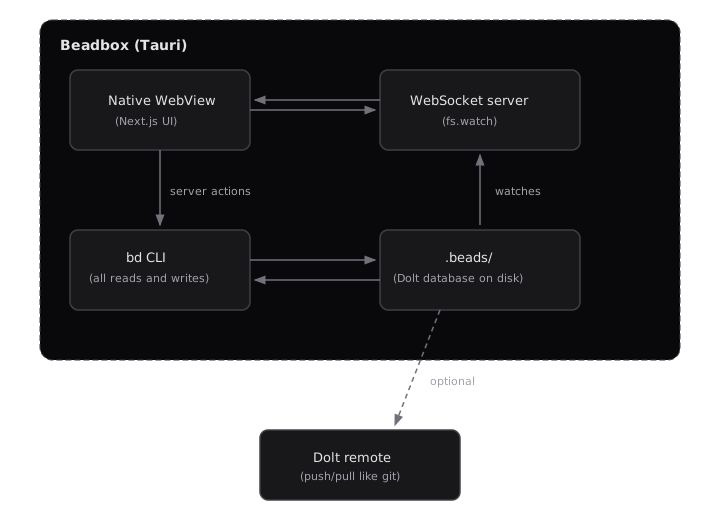
Embedded mode: The Dolt database lives in .beads/ on your filesystem. No server process, no daemon. The bd CLI reads and writes directly. Beadbox detects changes via fs.watch() with a 250ms debounce and broadcasts over WebSocket to the UI. This is the zero-setup path.
Server mode: A dolt sql-server process runs separately (local or LAN). The bd CLI connects over MySQL protocol. Beadbox polls the server every 3-5 seconds for changes instead of watching the filesystem. This mode supports multiple concurrent writers.
Every operation the GUI performs routes through the bd CLI. Beadbox never touches the database directly. If bd show and Beadbox disagree, that's a bug in Beadbox.
The beads CLI publishes benchmarks you can reproduce on your own hardware. Here are real numbers from an M2 Pro running the Go benchmark suite against a 10,000-issue Dolt database:
| Operation |
Time |
Memory |
Dataset |
| Filter ready work (unblocked issues) |
30ms |
16.8 MB |
10K issues |
| Search (all open, no filter) |
12.5ms |
6.3 MB |
10K issues |
| Create issue |
2.5ms |
8.9 KB |
10K issues |
| Update issue (status change) |
18ms |
17 KB |
10K issues |
| Cycle detection (5K linear chain) |
70ms |
15 KB |
5K deps |
| Bulk close (100 issues) |
1.9s |
1.2 MB |
Sequential writes |
| Sync merge (10 creates + 10 updates) |
29ms |
198 KB |
Batch operation |
These are CLI-level benchmarks: the time it takes bd to read from or write to the local Dolt database. The Beadbox UI adds rendering overhead on top. Our design targets for the full stack (CLI call + React render + WebSocket propagation) are:
| UI operation |
Design target |
| Epic tree render (100+ issues) |
< 500ms |
| Filter apply/clear |
< 200ms |
| Workspace switch |
< 1 second |
| Real-time update propagation (embedded) |
< 2 seconds |
| Cold start to usable |
< 5 seconds |
We don't publish benchmarks against Linear or other trackers because we haven't run controlled comparisons, and cherry-picked numbers wouldn't be honest. What we can say: the entire data path is local. There's no network hop between clicking a filter and seeing results. Whether that matters to you depends on your baseline. If Linear feels fast enough for your dataset size and location, it probably is. If you've felt the lag on a 500-issue backlog from a conference hotel Wi-Fi, you know the pain these numbers address.
To reproduce: clone beads, run go test -tags=bench -bench=. -benchmem ./internal/storage/dolt/..., and compare against your hardware. Cached datasets land in /tmp/beads-bench-cache/.
Git integration depth: beyond linking commits to issues
Most issue trackers treat Git integration as a feature checkbox: mention an issue ID in a commit message, and a link appears on the issue. That's useful but shallow.
Beadbox is built on beads, an issue tracker where Git semantics are the storage layer, not a bolted-on integration. Dolt, the database underneath, implements Git's merkle tree data model for structured data. Every issue change is a commit. Every commit has a parent. You get dolt diff, dolt log, and dolt merge on your issue history with the same semantics you use on code.
What that means practically:
Your issue history is auditable. The database itself is a commit graph. You can diff any two points in time and see exactly which fields changed on which issues. This isn't an "audit log feature" bolted on top. The storage format is the audit trail.
Branching works on issues, not just code. Dolt supports branches natively. You can branch your issue database to experiment with a reorganization, then merge it back or throw it away.
Sync is push/pull, not API calls. Multi-machine collaboration works like git push and git pull. No API tokens, no webhooks, no OAuth flows. Point your Dolt remote at a server (or DoltHub) and push. The other machine pulls.
A note on conflicts: Dolt uses three-way merge, same as Git. If two people edit different fields on the same issue, the merge resolves automatically. If two people edit the same field on the same issue, you get a conflict that requires manual resolution through the Dolt CLI (dolt conflicts resolve). Beadbox doesn't have a conflict resolution UI yet; you handle conflicts at the dolt level. In practice, conflicts are rare when each person (or agent) works on distinct issues, which is the typical pattern. But if your team frequently edits the same issues concurrently, this is a friction point you should know about. The Dolt merge documentation covers the resolution workflow in detail.
Native rendering: why we bundle Node.js inside Tauri
Linear runs in a browser tab. So does Jira, Asana, and every other SaaS tracker. Browser tabs compete for memory, get suspended by the OS, and render through a compositor that adds frames of latency.
Beadbox runs as a native desktop application built on Tauri. Tauri apps are typically tiny (the Tauri runtime itself is single-digit megabytes) because they use the OS native WebView instead of bundling Chromium. Our bundle is larger than typical Tauri apps at ~160MB, and that's a deliberate tradeoff worth explaining.
84MB of that is an embedded Node.js runtime. We use a sidecar architecture: Tauri spawns a Next.js server as a child process, which handles server-side rendering, server actions, and the WebSocket layer for real-time updates. The Tauri WebView points at this local server. We chose this over a pure Rust backend because the Next.js ecosystem gives us React Server Components, server actions, and rapid iteration speed on the UI layer. The cost is bundle size. An equivalent Electron app would be 400MB+. A pure Rust + Tauri app would be under 10MB but would have taken 3x longer to build and would lose the React ecosystem.
The practical difference over a browser tab: Beadbox renders in a dedicated WebView process that doesn't share memory with your other 47 browser tabs. Expanding an epic tree with 100+ nested issues, applying filters across a full backlog, switching between workspaces: these operations feel qualitatively different when the renderer isn't competing for resources.
Extending with the CLI, not a REST API
Linear has a GraphQL API. It's well-designed. But extending Linear means writing code that talks to their servers, authenticates with their tokens, and handles their rate limits.
Beadbox takes a different approach: the bd CLI is the API. Every operation the GUI performs goes through bd, the same command-line tool you'd use in your terminal.
Here are three workflows you can copy-paste today:
Bulk-update priorities for a triage sweep:
# Set all open bugs to priority 1 (critical)
bd list --status=open --type=bug --json | \
  jq -r '.[].id' | \
  xargs -I{} bd update {} --priority=1
Generate a daily status summary:
# What changed in the last 24 hours?
echo "=== Closed today ==="
bd list --status=closed --json | \
  jq -r '.[] | select(.updated > (now - 86400 | todate)) | "\(.id) \(.title)"'

echo "=== Currently blocked ==="
bd blocked --json | \
  jq -r '.[] | "\(.id) \(.title) (blocked by: \(.blocked_by | join(", ")))"'

echo "=== Ready to work ==="
bd ready --json | jq -r '.[] | "\(.id) [P\(.priority)] \(.title)"'
AI agent creates and claims work:
# Agent discovers a bug, files it, and claims it
ISSUE_ID=$(bd create \
  --title "Fix race condition in auth middleware" \
  --type bug \
  --priority 1 \
  --json | jq -r '.id')

bd update "$ISSUE_ID" --status=in_progress --assignee=agent-3

# ... agent does the work ...

bd update "$ISSUE_ID" --status=closed
bd comments add "$ISSUE_ID" --author agent-3 \
  "Fixed in commit abc1234. Root cause: mutex not held during token refresh."
If you're running AI coding agents (Claude Code, Cursor, Copilot Workspace), they already know how to run CLI commands. No API client library, no authentication dance. Just Unix pipes and shell scripts.
Try Beadbox to see these workflows visualized in real time as agents execute them.
Offline-first is not a feature, it's an architecture
Some cloud trackers offer an "offline mode" that caches recent data and syncs when you reconnect. That's a feature bolted onto a fundamentally online architecture. The failure modes are predictable: stale cache, sync conflicts, operations that silently queue and fail later.
Beadbox works offline because it was never online in the first place. In embedded mode, your entire issue database is a directory on your filesystem. No server process. No daemon. No network socket. The bd CLI reads and writes to that directory. Beadbox watches it with fs.watch() and renders what it finds.
There's nothing to sync because there's nothing remote. If you later choose to collaborate, Dolt's push/pull gives you explicit, visible synchronization. But the default is local. The default is yours.
What about security? If you're evaluating Beadbox for air-gapped or sensitive environments, here's the concrete posture:
- Encryption at rest: Beadbox doesn't encrypt the
.beads/ directory itself. It relies on OS-level disk encryption (FileVault on macOS, LUKS on Linux, BitLocker on Windows). If your threat model requires per-database encryption, this is a gap.
- Backups: Your
.beads/ directory is a regular directory. cp -r, rsync, Time Machine, or dolt push to a remote all work. Dolt's commit history also means accidental changes can be rolled back with dolt reset.
- What leaves the machine: In embedded mode, nothing. Zero network calls. In the desktop app, two optional outbound connections exist: GitHub API to check for Beadbox updates (can be disabled in settings), and PostHog analytics if you opt in (disabled by default, no PII collected). Neither transmits issue data.
For air-gapped environments, classified projects, or developers who work on planes and trains, this isn't a nice-to-have. It's the only architecture that works.
No per-seat pricing trap
Linear charges $8/month per member on the Standard plan. Reasonable for a five-person team. Less reasonable when your "team" includes 13 AI agents that need to read and write issues.
The per-seat model assumes stable, human-sized teams. Agentic engineering breaks that assumption. You might spin up 3 agents for a bug fix and 13 for a release. Each one needs API access. In SaaS pricing, every agent is a seat. Every seat is a line item. The cost scales linearly with a resource you're scaling exponentially.
beads is open-source. The CLI is free. There is no per-seat fee, no usage tier, no "contact sales for enterprise." You can run 2 agents or 200 against the same local database and the cost doesn't change.
Beadbox (the GUI) is free during the beta. Post-beta pricing hasn't been finalized, but it won't be per-seat. Agents aren't people. Charging per agent makes as much sense as charging per terminal window.
Open-source ecosystem
beads isn't a walled garden. The CLI is open-source at github.com/steveyegge/beads, and the community has built 30+ tools on top of it: custom reporters, CI integrations, agent orchestration scripts, dashboard extensions, and export adapters.
What this means practically:
You can inspect everything. The storage format is Dolt, which you can query with standard SQL. The CLI source is Go, readable and forkable. If bd create does something unexpected, you can read the code that runs it.
You can extend without asking permission. No marketplace approval process, no partner program, no API rate limit negotiation. Write a shell script, a Go plugin, or a Python wrapper. The CLI's --json flag on every command gives you structured output for piping into whatever you build.
Your data is portable. Dolt push/pull means your issue database can live on any server you control, sync to DoltHub, or stay on your filesystem forever. There's no export wizard because there's nothing to export from. The data is already yours, in a format you can query directly.
The community is building agent-specific tooling. The developers using beads daily are the ones running AI agent fleets. The extensions they build solve agent coordination problems: batch operations, dependency resolution scripts, fleet status reporters. This isn't theoretical community engagement. It's practitioners building tools for their own workflows and publishing them.
Agent-aware coordination
Most issue trackers treat "automation" as a webhook that fires when a human changes a status. That's retrofitting an API onto a human-first workflow. beads and Beadbox were designed from the start for AI agent coordination.
Structured agent identity. Each agent gets a CLAUDE.md file that defines its role, boundaries, and communication protocol. The bd CLI's --actor and --author flags tie every action to a specific agent. When eng2 claims a task and posts a plan, the system knows it was eng2, not a generic "automation."
The bd prime command. Run bd prime in any workspace and it outputs a context block designed for AI coding assistants. Paste it into your agent's system prompt and it knows the full command set, output formats, and workflow patterns. Teaching a new agent to use beads takes one command, not a documentation page.
Dependency graphs that agents actually use. Agents don't work with Kanban boards. They work with trees and blockers. beads tracks parent/child relationships and blocking dependencies natively. bd blocked shows every bead waiting on something else. bd ready shows everything that's unblocked and ready for work. Beadbox renders this as an interactive dependency tree where you can see at a glance what's stuck and why.
Real-time fleet visibility. Beadbox watches the beads database for changes and updates the UI within seconds. The Activity Dashboard shows agent status cards (who's active, who's quiet, who's stuck), a pipeline flow (where work is piling up), and a cross-filtered event feed (click an agent to see only their actions). This is the "mission control" view that makes 13 parallel agents manageable.
No tool is universally correct. Here's an honest breakdown:
Choose Linear if:
- Your team is 10+ people and needs centralized project management
- You rely on Slack/GitHub/Figma integrations
- Non-technical stakeholders need access to your issue tracker
- You want managed infrastructure with zero operational overhead
- You're a product team shipping on regular cycles
Choose Beadbox if:
- You value data sovereignty (issues never leave your machine)
- You work offline regularly or in restricted network environments
- You manage AI agents that need to read and write issues programmatically
- You want Git-native issue history (branch, diff, merge your issues)
- You prefer CLI-first workflows with a visual companion when needed
- You're a solo developer or small team (1-10) that doesn't need enterprise features
Keep using your current tool if:
- Switching cost exceeds the friction you're experiencing
- Your team has invested in integrations that depend on your current tracker's API
- Your workflow already fits your tool's opinions
Migrating from Linear (or other trackers)
Let's be direct: there is no automated Linear-to-Beadbox migration tool today. No CSV import wizard, no API bridge, no status mapping UI.
If you're starting fresh, that's fine. bd init, start creating issues, and Beadbox sees them immediately. Zero friction.
If you have an existing Linear project you want to bring over, the workable path right now is scripted: export from Linear's API (they support CSV and API export), transform the data, and use bd create in a loop to recreate issues. You'll lose Linear-specific metadata (cycles, project views, SLA timers) but preserve titles, descriptions, priorities, and status. A migration script is a weekend project, not a quarter-long integration.
We know this isn't good enough for teams with thousands of issues and years of history. Building a proper import pipeline is on our roadmap but not shipped yet. If migration friction is your primary concern, wait until we've built it, or evaluate whether starting fresh is acceptable for your use case.
Getting started
Beadbox is free during the beta. Install it with Homebrew:
brew tap beadbox/cask && brew install --cask beadbox
If you already use beads, Beadbox detects your existing .beads/ workspaces automatically. Open the app, and your issues are there. No import step. No account creation.
If you're new to beads, Beadbox walks you through initializing your first workspace. You'll be looking at your issues in under 60 seconds.
Download Beadbox or check out beads to see if local-first issue tracking fits your workflow.